
Last Updated: June 30, 2026
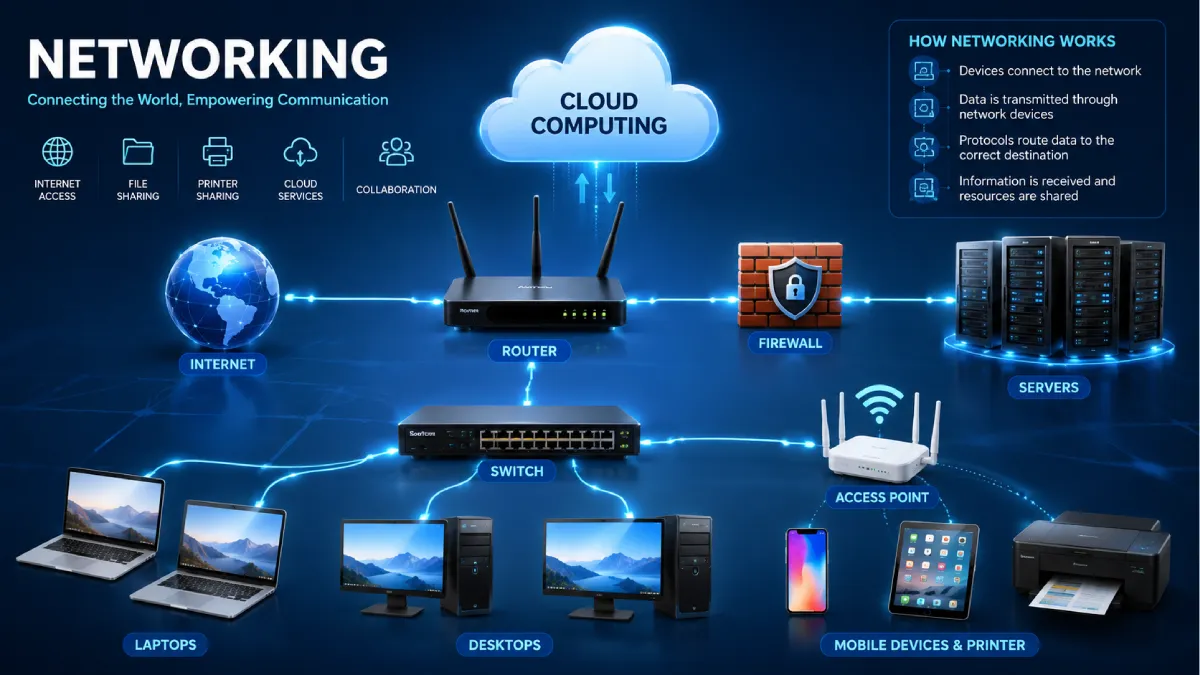
Networking is one of the most significant technologies that underpins our electronic world today. Whatever you are doing from internet browsing, video-streaming, attending online classes, working while you are away from office or using cloud services, it is all made possible because of networking.
In India, the ever-growing penetration of broadband connectivity, the widespread fibre-optic networks, 5G and cloud technology has made networking an essential part of everyday life – both at home and at work. It now underpins a large part of our entertainment systems, the smart devices we use in our homes, and the way businesses run on a daily basis.
Web networking knowledge does not have to be esoteric or require an extensive technical schooling. Basic networking concepts can help students, businesspeople, small office and home users decide wisely when building, securing and protecting their own networks. This guide to networking may be simple and straightforward, but it discusses those fundamental networking concepts that every first-time networker needs to know.
Table of Contents
What is Networking?
Networking is simply the establishing of links between two or more computers so that they can communicate and distribute information and resources. These resources may include files, printers, internet connections, applications, storage systems and cloud services.
A network may consist of just two computers connected together or thousands of devices communicating across different countries.
Examples of networking include:
- Connecting multiple laptops to the same Wi-Fi router
- Sharing files between office computers
- Accessing cloud storage from different devices
- Video conferencing over the internet
- Smart home devices communicating with each other
- Online banking and digital payment systems
If there was no networking then all computers would work on their own and sharing data and information would be very inefficient.
Why Networking Matters
Because information flows quickly and securely from user to user and from user to system, mainstream users are now dependent on Networking.
Some of its major benefits include:
- Faster communication
- Resource sharing
- Internet connectivity
- Centralised data storage
- Remote working capabilities
- Cloud application access
- Improved collaboration
- Business continuity
- Easier software updates
- Better scalability
Practically everybody and everything depends on networks around us such as schools, hospitals, banks, government departments etc. today.
How Does Networking Work?
Networking is the operation of collaborating between connected devices by using networking hardware and software protocols.
The basic workflow typically follows these steps:
| Step | Process |
| 1 | A device creates data, such as opening a webpage or sending an email. |
| 2 | The data is divided into smaller packets for efficient transmission. |
| 3 | The packets travel through networking devices such as switches and routers. |
| 4 | Network protocols determine the correct path and communication rules. |
| 5 | The destination device receives the packets. |
| 6 | The packets are reassembled into the original information. |
This entire process usually takes only milliseconds.
Basic Components of a Network
Every computer network consists of several important components that work together.
1. End Devices
These are the devices used by people or organisations.
Examples include:
- Desktop computers
- Laptops
- Smartphones
- Tablets
- Smart TVs
- Printers
- Servers
2. Transmission Media
Transmission media carries data between devices.
Common examples include:
- Ethernet cables
- Fibre-optic cables
- Wireless radio signals
- Satellite communication
3. Networking Devices
Specialised hardware manages data movement throughout the network.
Examples include:
- Routers
- Switches
- Hubs
- Access points
- Firewalls
- Modems
Each performs a different function to ensure reliable communication.
4. Network Software
Networking also depends on software that manages communication.
Examples include:
- Operating systems
- Network management software
- Security applications
- Firewall software
- Monitoring tools
Types of Computer Networks
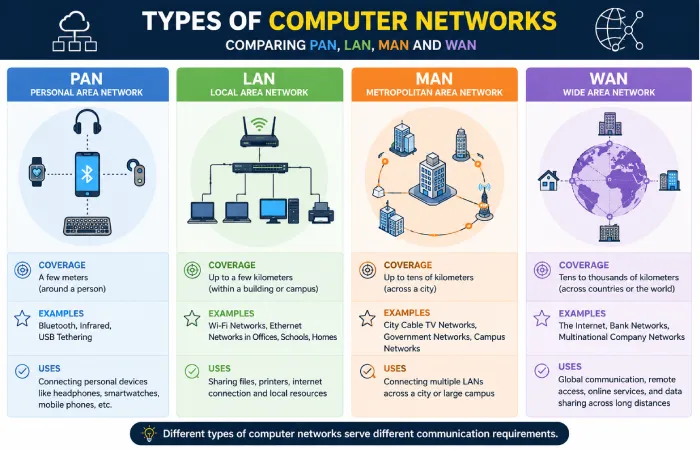
Networks are defined according to their size, spatial coverage and their purpose.
Personal Area Network (PAN)
A Personal Area Network is a very short-range network, usually a few metres or less.
Examples include:
- Bluetooth headphones
- Smartwatches
- Wireless keyboards
- Fitness trackers
PANs are designed for the personal suitability and low-power message.
Local Area Network (LAN)
A Local Area Network connects devices inside a limited area such as:
- Homes
- Schools
- Offices
- Computer laboratories
LANs offer:
- High speed
- Low latency
- Reliable communication
- Easy resource sharing
Most home Wi-Fi networks are examples of LANs.
Metropolitan Area Network (MAN)
A Metropolitan Area Network covers a city or large urban area.
It commonly connects:
- University campuses
- Government departments
- Municipal offices
- Large business branches
MANs provide higher capacity than LANs while covering much larger distances.
Wide Area Network (WAN)
A Wide Area Network connects systems across states, countries and continents.
Examples include:
- Banking networks
- Airline reservation systems
- International corporate offices
- Cloud computing infrastructure
The Internet itself is the world’s largest WAN.
Comparison of Network Types
| Network Type | Coverage Area | Typical Speed | Common Use |
| PAN | Personal devices | Medium | Bluetooth accessories |
| LAN | Building or office | Very High | Homes, schools, offices |
| MAN | City | High | Universities, municipalities |
| WAN | Countries and continents | Varies | Internet, multinational organisations |
Network Topologies
A network topology describes how devices are physically or logically connected.
Different topologies offer different advantages depending on the environment.
Bus Topology
In a bus topology, every device shares a single communication cable.
Advantages
- Simple installation
- Lower cost
- Suitable for small networks
Limitations
- Single cable failure affects communication
- Difficult troubleshooting
- Limited scalability
Star Topology
This is the most widely used topology today.
Each device connects to a central switch or router.
Advantages
- Easy maintenance
- Better performance
- Easy expansion
- Reliable communication
Limitations
- Central device failure affects the network
- Higher installation cost
Ring Topology
Devices are connected in a circular arrangement.
Data travels around the ring until it reaches its destination.
Advantages
- Predictable performance
- Equal access for devices
Limitations
- Difficult to expand
- Failure of one connection may interrupt communication unless redundancy is implemented
Mesh Topology
Every device is connected to multiple other devices.
This provides excellent redundancy and reliability.
Advantages
- Very reliable
- Multiple communication paths
- High fault tolerance
Limitations
- Expensive implementation
- Complex management
- Requires more cabling
Hybrid Topology
Current organizations tend to integrate varieties of topologies into a hybrid network.
Providing this level of service provides flexibility and room to grow in the future just would not be feasible without compromising costs and performance.
Common Networking Devices
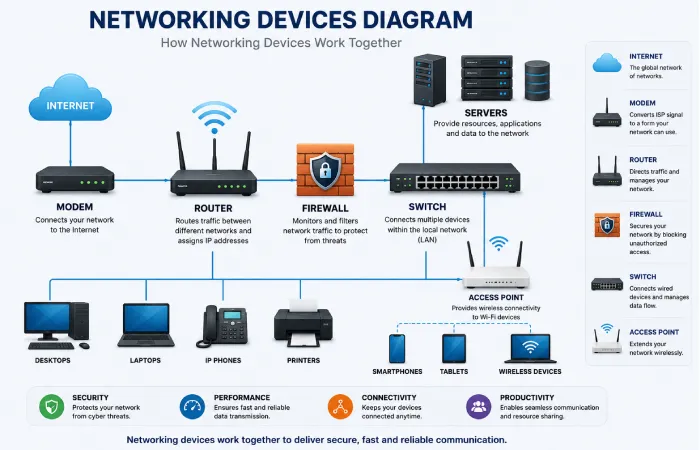
Networking hardware allows devices to communicate securely and effectively. All the devices perform a task within the network.
Router
A router connects different networks and directs data packets to their intended destination. In homes, it typically links your local network to your Internet Service Provider (ISP) while also managing Wi-Fi connectivity.
Common functions include:
- Connecting to the internet
- Assigning IP addresses
- Managing network traffic
- Supporting wireless connections
- Providing basic security through built-in firewall features
Switch
A switch connects multiple plans within the similar Local Area Network (LAN). Unlike older hubs, a switch intelligently sends data only to the envisioned device, refining competence and reducing superfluous traffic.
A network switch is commonly used in:
- Offices
- Schools
- Data centres
- Computer laboratories
Hub
A hub is a very primitive network device that simply sends any information received to all other devices connected to it. Due to this unselective nature of info transfer, it has now become outdated and is not used in current network machines.
Access Point
A wireless admission point provides additional Wi-Fi coverage and allows more wireless devices to connect to the network. Consequently, in large offices, hotels, hospital and university grounds multiple access points are connected.
Modem
A modem is what connects your home or office network to the internet that your ISP provides. It translates the digital signals arriving from your router into signals capable of travelling over the fibre-optic, cable or telephone system and vice versa.
Depending on your internet connection, you may use:
- Fibre modem (ONT)
- Cable modem
- DSL modem
- Integrated modem-router devices
Firewall
A firewall is a system (hardware or software) that monitors and even blocks the computer ‘s network traffic. The purpose of firewalls are to help prevent unauthorised access, and the provide the user with safe passage of normal network traffic.
Firewalls are widely used in:
- Businesses
- Government organisations
- Educational institutions
- Data centres
- Home networks
Besides filtering malicious websites, modern firewalls also can identify suspicious activity and support a secure remote access.
Server
A server can be described as a high-power computer which will offer services, data, applications or database to other computers connected to it.
Examples include:
- File servers
- Web servers
- Database servers
- Email servers
- Application servers
- Cloud servers
Many businesses now combine bodily servers with mist infrastructure for superior flexibility & scalability.
Common Networking Protocols
Networking protocols- Rules set out by manufacturers which enable all makes of computers to communicate successfully. If it weren ‘t for networking protocols, computers would have no common language in which to understand one another.
Some of the most widely used protocols include:
TCP/IP
This set of protocols is the core of today ‘s network and internet. It guarantees that data received the right way.
HTTP and HTTPS
HTTP (Hypertext Transfer Protocol) lets the web pages to be moved from the web server to the browsers.
HTTPS delivers a secure (encrypted) communiqué channel to protect transmitted information by encrypting it and includes passwords, payment particulars & personal information.
FTP
With file transfer protocol (FTP) computers can transfer files to and from a server. It is still widely used by webmasters and networks with large amounts of data.
SMTP
Simple Mail Transfer Protocol (SMTP) is the responsible for sending the emails between mail servers.
DNS
The Domain Name System (DNS) interprets human-readable site names into IP speeches that computers use to locate attendants.
For example, instead of retention a numerical IP address, users simply enter a site name into their browser.
Wired vs Wireless Networking
Both wired and wireless networks offer distinct advantages depending on the environment and intended use.
| Feature | Wired Networking | Wireless Networking |
| Connection | Ethernet cable | Wi-Fi |
| Speed | Usually, faster | Depends on signal strength |
| Stability | Very stable | May experience interference |
| Installation | Requires cabling | Easier installation |
| Mobility | Limited | Excellent |
| Security | Generally more secure | Requires strong encryption |
| Maintenance | Less interference | Easier expansion |
Which Option Is Better?
A wired connection is often preferred for:
- Online gaming
- Video editing
- Large file transfers
- Business servers
- Financial systems
Wireless networking is ideal for:
- Smartphones
- Tablets
- Laptops
- Smart TVs
- Home automation devices
- General internet browsing
Many organisations use a mixture of both to balance performance & suppleness.
Home Networking vs Business Networking
Although both types of networks share similar principles, their requirements differ considerably.
| Home Network | Business Network |
| Supports all the small number of devices | Ropes hundreds or thousands of campaigns |
| Simple setup | Complex architecture |
| Consumer-grade hardware | Enterprise-grade equipment |
| Basic security | Advanced cybersecurity controls |
| Lower maintenance | Dedicated IT management |
| Suitable for everyday internet use | Designed for mission-critical operations |
Business networks often include additional technologies such as:
- Virtual Local Area Networks (VLANs)
- Virtual Private Networks (VPNs)
- Interruption Detection Systems (IDS)
- Centralised authentication
- Redundant internet connections
- Network monitoring platforms
Benefits of Networking
Networking provides numerous advantages for individuals, businesses and informative institutions.
Efficient Resource Sharing
Users can share:
- Printers
- Storage devices
- Internet connections
- Software applications
- Files
This decreases hardware costs & recovers productivity.
Improved Communication
Networking enables instant communication through:
- Video conferencing
- Messaging platforms
- Voice-over-IP (VoIP)
- Collaboration tools
Teams can effort together regardless of their bodily position.
Centralised Data Management
Companies may have their information stored on a server rather than on individual computers which makes backup, security and maintenance much easier to administer.
Remote Access
They can be securely accessed when the employee is working from home or while travelling, overseeing a hybrid or remote work model.
Scalability
The modern networks rise as an organisation develops. When an organisation develops, it can add new devices and new services to the organisation without the need to change working devices.
Cloud Integration
Networking enables seamless access to cloud services for:
- File storage
- Data backup
- Software applications
- Artificial intelligence tools
- Business collaboration platforms
Limitations of Networking
While networking the offers many profits, it also presents the certain trials.
Security Risks
Poorly secured networks may become targets for:
- Malware
- Phishing attacks
- Ransomware
- Data theft
- Unauthorised access
Regular updates & strong security performs are vital.
Initial Cost
Building a reliable network that requires the investment in:
- Routers
- Switches
- Cabling
- Servers
- Security devices
- Professional installation
Larger organisations may also require ongoing maintenance contracts.
Technical Complexity
Often, large enterprise networks need a resident IT expert to oversee shape, management and monitoring and troubleshooting.
Downtime
Business could be interrupted by hardware failure, software errors, and Internet outages if there are no backup systems.
Workflow: How Data Travels Across a Network
Understanding the journey of data helps explain why networking is so efficient.
- A user requests information, such as opening a website.
- The device converts the request into digital packets.
- The router forwards the request towards its destination.
- Switches direct traffic within local networks.
- Internet infrastructure carries the packets across multiple networks.
- The destination server processes the request.
- The response is returned through the network.
- The user’s device reconstructs the packets and displays the requested information.
This entire process generally occurs within fractions of a second.
Performance Expectations
Networking performance hang on the several factors, & users should have realistic expectations.
Factors that influence performance include:
- Internet connection speed
- Network congestion
- Router quality
- Signal strength
- Device capability
- Cable quality
- Server performance
- Distance from wireless access points
No matter how fast your connection, it won’t do you any good if you have older equipment, an inadequate Wi-Fi signal or a congested network. Keep your equipment maintained and kept up to date.
Network Security Best Practices
With our networks becoming more and more interconnected protecting data and devices has never been so important. Cyber security is no longer something only large organisations need to be concerned about; home users’ students and small businesses need to take security precautions as well.
Use Strong Passwords
All networking equipment like routers and wireless access points should have distinct and robust password. Default passwords/ user-names sent from the manufacturer should be changed when installing hardware.
A strong password typically includes:
- Uppercase and lowercase letters
- Numbers
- Special characters
- At least 12–16 characters
Avoid using easily predicted information such as names, birthdates or phone figures.
Enable WPA3 or WPA2 Encryption
Wi-Fi encoding: is used to protect the data being communicated among the CPU and the wireless router.
Where available, WPA3 offers higher security than the previous values. If not available, WPA2-AES is still a secure option.
Older standards like WEP should be evaded as they can be broken easily.
Keep Software Updated
Network equipment is regularly upgraded with new firmware issues to accommodate security patches, enhance performance & add new features.
Users should periodically update:
- Routers
- Switches
- Firewalls
- Access points
- Network management software
Automatic updates can simplify this process where available.
Install Reliable Security Software
Security software is used to identify the stop threats before they reach to connected devices.
Useful tools include:
- Antivirus software
- Anti-malware protection
- Firewalls
- Endpoint protection
- Network monitoring applications
These solutions should accompaniment—not replace—safe browse habits.
Back Up Important Data
Even well-protected nets can experience hardware failures or cyber incidents.
Regular backups ensure that important files can be restored if data is lost due to:
- Hardware damage
- Ransomware attacks
- Accidental deletion
- Software corruption
Cloud storage combined with offline backups provides an effective strategy for many users.
Monitor Network Activity
Businesses often the monitor their networks unceasingly to identify unusual activity.
Signs that may indicate a problem include:
- Unexpected slowdowns
- Unknown connected devices
- Frequent disconnections
- Large unexplained data transfers
- Suspicious login attempts
Early detection helps reduce the impact of potential security incidents.
Applications of Networking
Networking supports countless services used every day across different industries.
Education
Educational institutions use networking for:
- Online learning platforms
- Digital classrooms
- Student information systems
- Shared computer laboratories
- Cloud-based collaboration
Healthcare
Hospitals and clinics depend on networking to manage:
- Electronic health records
- Diagnostic imaging
- Telemedicine consultations
- Laboratory systems
- Nomination scheduling
Banking and Finance
Secure networking enables:
- Online banking
- ATM connectivity
- Digital payments
- Fraud monitoring
- Real-time transaction processing
Business
Modern organisations rely on networking for:
- Email communication
- Video conferencing
- Customer relationship management (CRM)
- Enterprise resource planning (ERP)
- Cloud computing
- Remote working
Smart Homes
Home networks increasingly support connected devices such as:
- Smart televisions
- Security cameras
- Smart lighting
- Voice assistants
- Smart thermostats
- Home automation systems
Future Trends in Networking
Networking technologies are also constantly being improved for future generations. Below are a few of the developments that are anticipated to impact the future of the digital realm.
5G Connectivity
Different aspects of 5 G networks include the expansion of higher speed, lower latency and. It is said this knowledge will offer enhanced mobile infrastructures, greater provision for connected devices, keen cities and industrial mechanization.
Artificial Intelligence
AI is assisting network managers by enabling automated nursing, prediction of disappointments and traffic management optimization.
AI-classified networking discovers incorrect activity promptly.
Internet of Things (IoT)
The number of net-connected policies remains to produce rapidly.
Examples include:
- Smart appliances
- Industrial sensors
- Connected vehicles
- Wearable devices
- Agricultural monitoring systems
These technologies need reliable and safe network substructure.
Expectations: What Networking Can and Cannot Do
While the benefits that come with networking are very numerous, being aware of its drawbacks is equally crucial in providing regular expectations.
A well-designed network can:
- Enable reliable communication
- Improve collaboration
- Support cloud applications
- Share resources efficiently
- Increase operational productivity
However, networking alone cannot:
- Guarantee complete cybersecurity
- Eliminate internet outages
- Compensate for poor internet service
- Fix outdated devices automatically
- Prevent every hardware failure
Good planning, regular maintenance and strong security practices remain essential for achieving consistent performance.
Conclusion
Networking is the backbone of any modern, interconnected digital world. Whether it is a simple home Wi-Fi network or a sophisticated global enterprise platform, it is networks that make possible fast, secure, dependable communications between devices. They are what makes education, health care, banking, entertainment, cloud computing and almost everything else possible.
Having a grasp of the basics of networking allows you to understand the significance of different network architectures and equipment, security issues and maintenance considerations. Whether you are a student putting together a computer networking course, a business system manager or a home user attempting to improve your Wi-Fi coverage and performance, knowing about networking will stay with you for many years to come.
