
Last Updated: June 24, 2026
Software exists in every electronic piece of equipment we use today. From browsing the internet to writing documents, even making a decision on what video game to buy or performing a business application software is still always busy doing something behind the scene. However, this not how all softwares work and not all softwares are used for the same reason.
Not only do students have to know the difference between system software and request software but IT workers, business owners or even your ‘average’ CPU user does too. The pages that follow will give you a good description of how each works, the difference, the examples, the benefits plus how it all works in today ‘s new age computers in 2026.
Table of Contents
What is System Software?
System software is computer software that manages the hardware and provides a platform on which application software can run. It provides a bridge from the hardware to the applications.
A computer requires system software in order to run.
Common Examples of System Software
| System Software | Purpose |
| Windows 11 | Operating System |
| Linux | Operating System |
| macOS | Operating System |
| Device Drivers | Hardware Communication |
| BIOS/UEFI Firmware | Hardware Initialization |
| Utility Programs | System Maintenance |
Main Functions
- Manages hardware resources
- Controls memory allocation
- Handles input/output operations
- Provides security and system stability
- Supports application execution
What is Application Software?
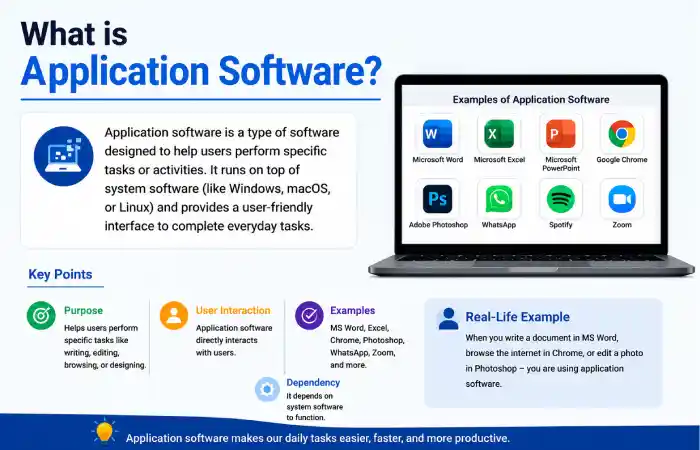
Application software helps users perform specific tasks. Unlike system software, it directly interacts with users to accomplish practical objectives.
Common Examples of Application Software
| Application Software | Purpose |
| Microsoft Word | Document Creation |
| Google Chrome | Web Browsing |
| Adobe Photoshop | Image Editing |
| Zoom | Video Conferencing |
| Spotify | Music Streaming |
| Communication |
Main Functions
- Helps users perform specific tasks
- Increases productivity
- Supports entertainment and communication
- Enables business operations
System Software vs Application Software:
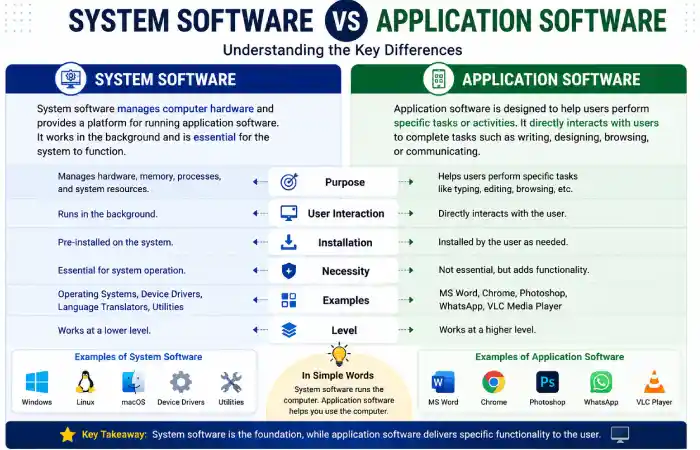
| Feature | System Software | Application Software |
| Purpose | Manage hardware and system resources | Perform user-specific tasks |
| User Interaction | Limited | Direct |
| Installation | Usually pre-installed | Installed as needed |
| Dependency | Required for system operation | Depends on system software |
| Execution | Runs in background | Runs when user launches it |
| Examples | Windows, Linux, BIOS | Chrome, Word, Photoshop |
| Resource Access | Direct access to hardware | Uses system software APIs |
| Necessity | Essential | Optional |
2026 Software Usage Comparison
Estimated Global Usage Trends (2026)
| Category | Market Usage Share |
| Operating Systems (System Software) | 100% |
| Productivity Applications | 88% |
| Web Applications | 84% |
| Mobile Applications | 91% |
| Cloud-Based Applications | 79% |
Key Trend: Modern organizations increasingly rely on cloud-based application software while system software remains the foundation of all computing devices.
How System Software and Application Software Work Together
A simple example:
- You turn on your computer.
- BIOS/UEFI initializes hardware.
- Windows or Linux loads.
- You open Google Chrome.
- Chrome uses operating system services to access memory, storage, and network resources.
Without system software, application software cannot function.
Workflow Diagram
Hardware
↓
System Software
↓
Application Software
↓
User
Real-World Examples
Example 1: Online Meeting
| Component | Software |
| System Software | Windows 11 |
| Application Software | Zoom |
Windows manages hardware resources while Zoom provides communication features.
Example 2: Graphic Design
| Component | Software |
| System Software | macOS |
| Application Software | Adobe Photoshop |
macOS controls hardware and memory while Photoshop performs image editing tasks.
Related Software Comparisons
As part of your software fundamentals learning path, also explore:
- Windows vs Linux
- Hardware vs Software
- BIOS vs UEFI
- Desktop Apps vs Web Apps
These topics help build a complete understanding of modern computing systems.
Advantages of System Software
| Advantage | Description |
| Hardware Management | Controls system resources |
| Security | Provides protection mechanisms |
| Stability | Maintains system operations |
| Resource Allocation | Optimizes performance |
| Platform Support | Enables application execution |
Advantages of Application Software
| Advantage | Description |
| Productivity | Speeds up work |
| Automation | Make simpler boring tasks |
| Communication | Connects users globally |
| Creativity | Supports design and content creation |
| Accessibility | Enables task-specific solutions |
Common Misconstructions
Myth 1: Windows Is Application Software
False.
Windows is an working system and therefore system software.
Myth 2: Requests Can Run Without an Working System
False.
Requests rely on operating organizations for memory management, storage access, and hardware communication.
Myth 3: System Software Is Only for IT Professionals
False.
Every computer user interacts with system software daily, even if they don’t notice it.
Troubleshooting Common Software Issues
Application Not Opening
Possible Causes
- Corrupted installation
- Missing system updates
- Insufficient RAM
Solution
- Reinstall application
- Update operating system
- Restart computer
Hardware Not Detected
Possible Causes
- Driver issues
- Outdated firmware
- Device failure
Solution
- Update drivers
- Check BIOS/UEFI settings
- Test hardware connection
Slow System Performance
Possible Causes
- Excessive background processes
- Low storage space
- Malware infection
Solution
- Remove unnecessary applications
- Free storage space
- Run security scans
Which Is More Important?
This question often appears in software comparison searches.
The reality is that both are equally important.
| Scenario | Most Important |
| Booting Computer | System Software |
| Writing Documents | Application Software |
| Gaming | Both |
| Business Operations | Both |
| Web Browsing | Both |
System software creates the foundation, while application software delivers user value.
Future Trends in 2026
System Software Trends
- AI-powered operating systems
- Enhanced cybersecurity features
- Better energy efficiency
- Advanced virtualization support
Application Software Trends
- AI-assisted productivity tools
- Cloud-native applications
- Cross-platform compatibility
- Increased automation features
FAQ’s
Is Windows system software or application software?
Windows is system software because it functions as an operating system.
Can application software run without system software?
No. Application software depends on system software to access hardware resources and execute tasks.
Is Google Chrome system software?
No. Google Chrome is application software because it is used for web browsing.
Is BIOS considered system software?
Yes. BIOS and UEFI are forms of system software that initialize hardware during startup.
Which comes first: system software or application software?
System software comes first because it must be load before requests can run.
Conclusion
So, there is no great debate System Software vs Application Software. System Software is to be used by the device, and application software to be used by the user of the device to do useful functions.
For ‘news guy’ who knows nothing of the argument above, knowing this simple distinction provides an excellent basis for learning a variety of other fundamental technology topics from Windows v Linux to BIOS v UEFI, Platform hardware v Software to Desktop Apps v Web Apps. As the software worlds evolve in 2026, this knowledge is more important than ever.
