
Last Updated: July 2, 2026
We rely on software in pretty much everything digital today, from checking the news, send a mail to managing our business. When there is no software to control and instruct all those pieces of silicon, these machines and mobile gadgets just look like mere electronic parts, and doing little with them. The more the software gets intelligently, interconnected and accessible through cloud computing and artificial intelligence technology advances. Business companies need enterprise software to increase business, just like consumers prefer mobile and PC software to connect and share knowledge and enjoy live games, or for business as well.
Table of Contents
Software at a Glance
| Feature | Details |
| Category | Computer Technology |
| Purpose | Performs digital tasks and controls hardware |
| Runs On | Computers, smartphones, tablets, servers and smart devices |
| Users | Individuals, businesses, schools, healthcare organisations and governments |
| Common Examples | Operating systems, browsers, office suites, design tools, security software and business applications |
| Licensing | Free, Open Source, Subscription and Commercial |
What Is Software?
Software The digital instructions that tell a CPU, a machine or other electronic device how to operate and the functions it should carry out. Unlike hardware, the physical aspects of a computer (processors, storage drives, peripherals, etc), software is intangible; it comes in the form of code, data and algorithms. Anything you do on your computer – be it opening an app, editing a spreadsheet or visiting a web page – relies on software to translate its instructions into an output that we can see or hear.
Software can be as meek as the program that runs your computer’s calculator or as complex as an enterprise resource planning (ERP) system.
Modern applications also frequently collaborate with cloud applications and services through cloud-enabled APIs.
Why Software Is Important
Software has become an essential part of everyday life because it transforms the hardware into the valuable tools.
Some key reasons include:
- Automates repetitive work
- Improves productivity
- Enables communication
- Supports education
- Facilitates online banking
- Powers e-commerce
- Strengthens cybersecurity
- Drives business operations
- Enables entertainment
- Supports scientific research
Without software, today’s digital economy would not exist.
How Software Works
How to make an app the way programs work by processing instructions written in a programming language by computer developers. All such written instruction is converted into the language that machine processes.
A simplified workflow looks like this:
User Input
↓
Software Processes Information
↓
Operating System Coordinates Resources
↓
Hardware Executes Instructions
↓
Output Displayed to User
Every click, tap or command follows this general process, often within milliseconds.
Main Types of Software
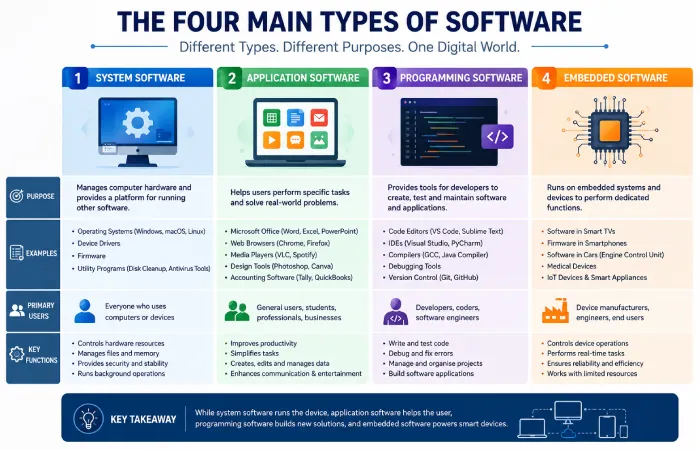
Software can be grouped into several major categories based on its purpose.
1. System Software
System software coordinates computer hardware and supplies the base that supports further applications.
Examples include:
- Operating systems
- Device drivers
- Firmware
- Utility programs
Its primary role is ensuring that hardware resources are allocated efficiently.
2. Application Software
Application software helps the users to complete exact tasks.
Common examples include:
- Word processors
- Spreadsheet software
- Web browsers
- Video conferencing tools
- Graphic design applications
- Media players
- Accounting software
This is the software most people interact with every day.
3. Programming Software
Programming software assists the developers in creating the applications.
Examples include:
- Code editors
- Integrated Development Environments (IDEs)
- Debugging tools
- Compilers
- Version control systems
These tools simplify software development and maintenance.
4. Embedded Software
Entrenched software operates inside electric devices somewhat than old-style computers.
Examples include:
- Smart TVs
- Washing machines
- Cars
- Medical equipment
- Smart home devices
- Industrial machinery
Entrenched software is designed for exact hardware and usually achieves devoted tasks.
Types of Software Comparison
| Type | Primary Purpose | Typical Users | Examples |
| System Software | Controls hardware | Everyone | Operating systems |
| Application Software | User tasks | Individuals & Businesses | Office suites |
| Programming Software | Develop software | Developers | IDEs |
| Embedded Software | Controls devices | Manufacturers & Users | Smart appliances |
Key Features of Modern Software
Most of today’s software offers a mixture of usability enhancement capabilities and efficiency optimization functionalities.
User-Friendly Interface
Modern applications prioritise intuitive navigation, making them accessible even to beginners.
Cloud Synchronisation
Many applications automatically synchronise files and settings across multiple devices.
Security Features
Common security capabilities include:
- Encryption
- Two-factor authentication
- Automatic updates
- Password protection
- Secure cloud storage
Automation
Automation switches routine manual work with prearranged flows & smart procedures.
Cross-Platform Compatibility
Many software products are available on:
- Windows
- macOS
- Linux
- Android
- iOS
- Web browsers
This suppleness allows users to work across different strategies.
Common Uses of Software
Software serves a wide range of industries and personal activities.
Education
Students and teachers use software for:
- Online learning
- Virtual classrooms
- Assignment management
- Digital textbooks
- Collaboration
Healthcare
Healthcare organisations rely on software for:
- Electronic medical records
- Appointment scheduling
- Diagnostic imaging
- Laboratory management
- Telemedicine
Business
Businesses depend on software to manage:
- Finance
- Human resources
- Inventory
- Customer relationships
- Marketing
- Sales
- Project management
Entertainment
Popular entertainment uses include:
- Music streaming
- Video streaming
- Gaming
- Photo editing
- Video production
- Social media
Manufacturing
Industrial software supports:
- Automation
- Robotics
- Production monitoring
- Supply chain management
- Quality control
Workflow: How Software Is Developed
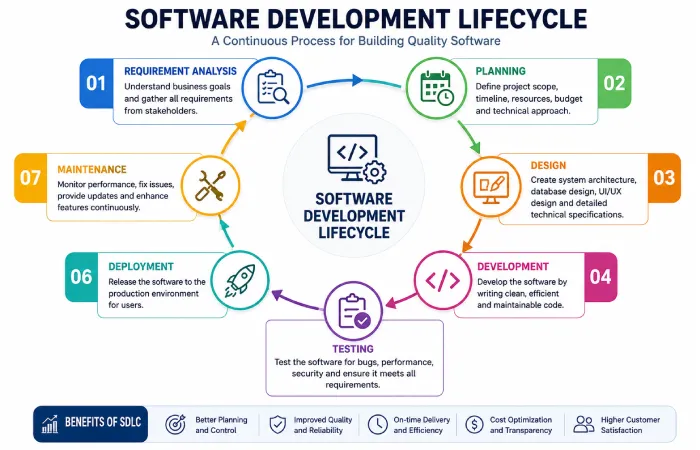
Developing dependable software typically follows the organized lifecycle.
Step 1: Requirement Analysis
Developers gather the business or user needs & define project objectives.
Step 2: Planning
The project choice, timeline, budget and practical architecture are documented.
Step 3: Design
User interfaces, databases & system architecture are planned.
Step 4: Development
Programmers write & integrate the software code.
Step 5: Testing
The submission undergoes functional, safety & performance testing to order and fix issues.
Step 6: Deployment
The completed software is unconfined to users.
Step 7: Maintenance
Developers continue providing the updates, bug fixes & security improvements.
Expectations: What Software Can and Cannot Do
Choosing software with realistic expectations is important.
Software Can
- Improve productivity
- Automate repetitive tasks
- Reduce manual errors
- Organise information efficiently
- Enable collaboration
- Support informed decision-making
Software Cannot Always
- Eliminate all human error
- Replace expert judgement in every situation
- Guarantee complete cybersecurity
- Operate efficiently on outdated hardware
- Solve every business challenge without proper implementation
For it to work well requires user training, hardware that supports it and that the system is kept up to date with regular patching, etc. And has good security practices.
Advantages of Software
Computers have completely changed the way that people live, work, communicate and learn and if used to the best advantage, the appropriate software can have an enormous benefit in the office or at home, making processes easier and a lot less confusing.
1. Increases Productivity
Automates mundane tasks Software to get work done faster Office apps, project management solutions and automation platforms reduce manual labour.
2. Improves Accuracy
Many application systems are used to reduce human errors such as by carrying out calculations, verifying data and following specific rules of behaviour, e.g. In accountancy, engineering and healthcare.
3. Enhances Communication
With the use of Communication Software, messages can be sent in an instant, conferences are video assisted and emailing/team discussions are held between different parts of the world.
4. Supports Remote Working
Cloud software enables employees to access files and documents, collaborate with each other and attend meetings on the move, anywhere there’s a internet connection.
5. Better Data Management
Organizations utilize software applications to structure the data of the customers, accounts of customers, inventory data, as well as operational data.
6. Scalability
A lot of modern software systems are designed to scale with the organisation as user and data volumes grow and the system doesn’t need to be ripped out and replaced.
Limitations of Software
While there are numerous advantages of software it also contains a set of shortcomings that users need to recognize.
Initial Cost
There might be a license fee, the costs of implementing the commercial software, or ongoing payment charges.
Learning Curve
Advanced applications often require training before users become fully proficient.
Hardware Requirements
Some software performs best on modern hardware with sufficient processing power and memory.
Internet Dependency
Cloud-based applications often require a stable internet connection for full functionality.
Security Risks
Not updating the software leaves it open for all sorts of malware, ransomware and cyber-attacks.
Compatibility Issues
Older software may not work correctly with newer operating systems or hardware.
Popular Categories of Software
Different users require different types of software depending on their goals.
| Category | Purpose | Common Users |
| Operating Systems | Manage computer hardware | Everyone |
| Office Software | Documents and spreadsheets | Students, Businesses |
| Graphic Design | Create digital artwork | Designers |
| Video Editing | Edit multimedia content | Content Creators |
| Accounting Software | Financial management | Businesses |
| Security Software | Protect devices | Home & Business Users |
| Database Software | Store structured information | Organisations |
| Web Browsers | Internet access | Everyone |
| Educational Software | Learning and teaching | Schools and Students |
| Project Management Software | Team collaboration | Businesses |
How to Choose the Right Software
Selecting software involves more than choosing the product with the longest feature list. Consider your actual needs and future requirements.
Identify Your Goals
Decide what problem the software should solve. For example:
- Managing finances
- Editing photos
- Running a business
- Learning new skills
- Improving productivity
Check System Requirements
Ensure your computer or mobile device meets the recommended specifications.
Compare Features
Look beyond marketing claims and compare:
- Ease of use
- Security features
- Customer support
- Update frequency
- Integration with other tools
- Cloud capabilities
Read Independent Reviews
Professional reviews and verified user feedback can provide insights into real-world performance and reliability.
Consider Total Cost
Evaluate not only the purchase price but also subscription fees, maintenance costs and potential upgrade expenses.
Free vs Paid Software
Choosing between free and paid software depends on your budget and requirements.
| Feature | Free Software | Paid Software |
| Cost | Free | Subscription or Licence |
| Features | Basic to Moderate | Usually More Comprehensive |
| Customer Support | Community-based | Dedicated Support |
| Updates | Varies | Regular Updates |
| Security | Depends on Developer | Often Enhanced |
| Suitable For | Personal Use | Professional & Business Use |
Neither option is universally better. Many free applications provide excellent functionality, while paid software often includes advanced features, enterprise support and stronger security.
Common Software Trends
The software industry continues to evolve fast.
Artificial Intelligence
AI-powered software contributions with script, data analysis, automation, customer service and image generation.
Cloud Computing
More applications are brought through the cloud, reducing the need for local installation and simplifying updates.
Cybersecurity Enhancements
Developers increasingly focus on safe authentication, encryption and proactive threat detection.
Low-Code and No-Code Platforms
These platforms allow users to build requests with minimal programming knowledge.
Cross-Platform Development
Desktop, tablet, smartphone and web-browser based applications are now typically created to work in the same way across all of them.
Common Mistakes When Choosing Software
Avoid these common pitfalls:
- Choosing based solely on price.
- Ignoring compatibility with existing devices.
- Overlooking security and privacy features.
- Purchasing unnecessary advanced features.
- Failing to review licence terms.
- Skipping software updates after installation.
- Not creating regular backups.
Taking time to evaluate software carefully can save both money and frustration later.
FAQ’s
What is software?
Digital instructions and instructions to carry out particular jobs is described as software to work with the physical components.
What are the main types of software?
The main categories include:
- System software
- Application software
- Programming software
- Embedded software
Each serves a different purpose within a computing environment.
Why are software updates important?
Updates often include:
- Security patches
- Bug fixes
- Performance improvements
- New features
- Compatibility enhancements
Installing updates helps maintain stability and protect against security vulnerabilities.
How do I choose the best software?
Consider your areas, budget, required features, device compatibility, safety, ease of use and long-term nourishment before making a decision.
Conclusion
Today software provisions every connected activity we do, counting social networking, haute finance and the most cutting-edge science. New trends such as Cloud computing and AI will make software even more intuitive and indispensable. When buying, don’t buy for features, but instead, for suitability based on your requirements.
You should look for a number of key factors such as; ease of use, security, compatibility with existing systems and the long-term viability of ongoing support.
Knowing the different types of software and what they can do, will enable organisations and individuals to make educated decisions that enhance productivity and overall digital experiences.
