
Last Updated: July 3, 2026
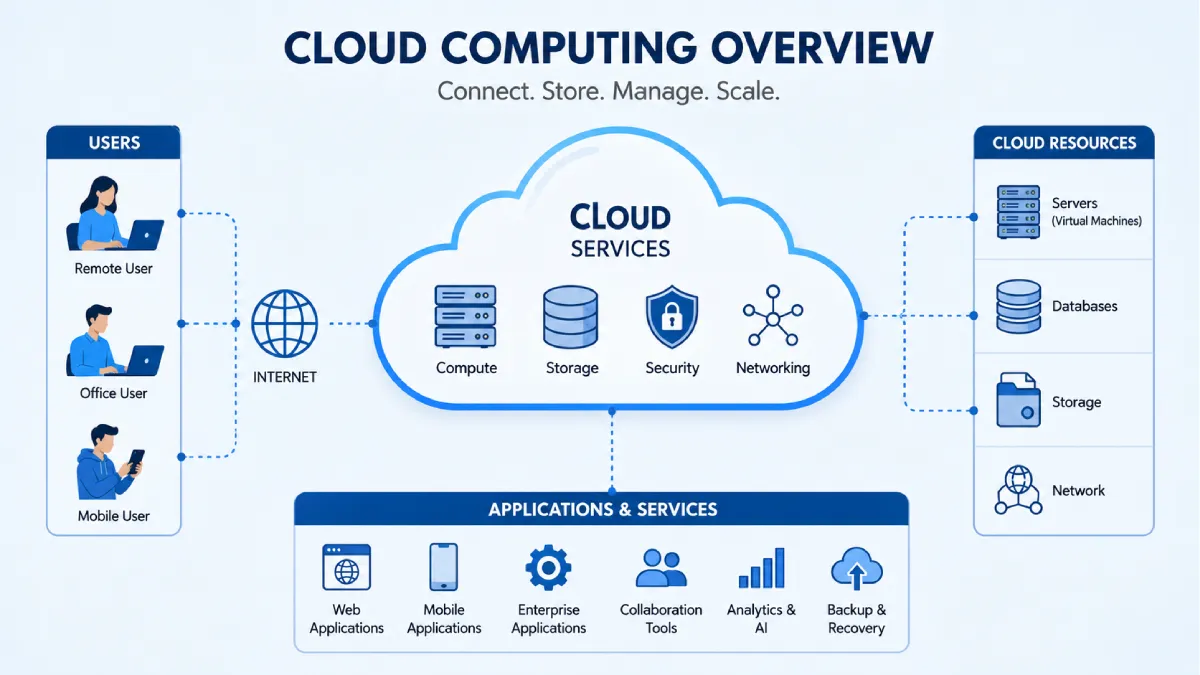
Cloud technology has revolutionised information storage, applications and digital services operation. Instead of saving all data on a hard drive or a local network, the user can connect to Cloud Computing through the web and use computing power at any time.
Today a wide variety of organisations including small to medium size businesses, educational institutions, health care providers and government agencies rely on Cloud computing for increased efficiency, collaboration and scalability. People are also using technology in the Cloud, often without even noticing, on a daily basis via:
If you are a student, business owner or IT professional, learning about Cloud computing will help you brand more knowledgeable technology choices & prepare you to utilize the digital facilities of tomorrow.
Table of Contents
Definition
Cloud computing is a new way of providing computer services through the Internet. It allows accessing various types of resources such as servers, storage, applications, and services over the web. It does not require buying and managing hardware which otherwise would be very costly. Customers use the resources on a “pay-as-you-go” basis.
What Is Cloud Computing?
In cloud computing, data and applications are stored in remote protected data centres, hosted by specialised providers. Users can then access to these data or applications through the internet by computer, smart phone or tablet.
Using traditional IT infrastructure, companies must buy, deploy, and maintain more servers which also involves maintaining…investments in software. Cloud services take on a good portion of these and allow companies to spend… More time on the business instead of management.
Examples of everyday Cloud usage include:
- Online file storage
- Email services
- Video streaming
- Online collaboration tools
- Website hosting
- Business software
- Mobile application data synchronisation
How Does Cloud Computing Work?
Most of the cloud providers will have huge networks of servers located in data centres, which are installed securely across locations all around the world.
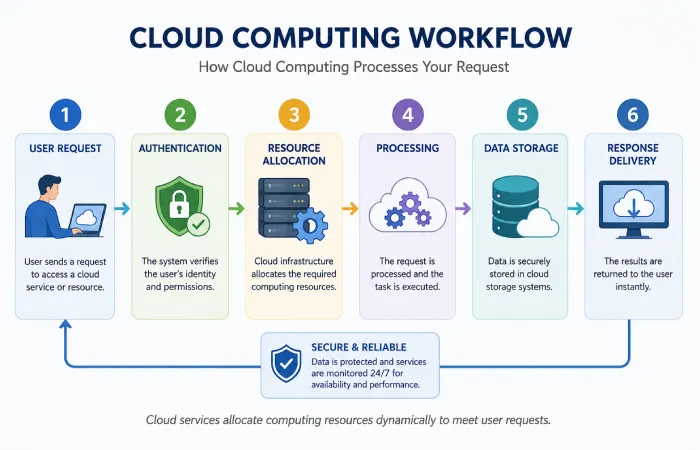
When a user requests a service:
- The request is sent over the internet.
- The Cloud provider processes the request.
- Required computing resources are allocated.
- Data is securely stored or processed.
- Results are returned to the user’s device.
Workflow: How Cloud Computing Works
| Step | Process |
| User connects | Accesses Cloud through internet |
| Authentication | Identity verification |
| Resource allocation | Virtual servers assigned |
| Processing | Applications run remotely |
| Data storage | Information saved securely |
| Response | Results delivered instantly |
Types of Cloud Computing
Different Cloud deployment models are designed for different organisational needs.
Public Cloud
Organization is owned & managed by a third-party provider.
Suitable for:
- Small businesses
- Start-ups
- Personal users
- Development environments
Advantages include:
- Low initial investment
- High scalability
- Easy deployment
Private Cloud
Infrastructure is dedicated to one organisation.
Often chosen by:
- Banks
- Healthcare organisations
- Government agencies
- Large enterprises
Benefits include:
- Greater control
- Enhanced security
- Custom configurations
Hybrid Cloud
Hybrid Cloud associations public and private Cloud environments.
It enables organisations to:
- Keep sensitive data private
- Use public Cloud for scalable workloads
- Optimise operational costs
Multi-Cloud
Multi-Cloud: Using services of multiple providers than a single Cloud database.
Benefits include:
- Reduced vendor dependency
- Better disaster recovery
- Improved flexibility
Main Cloud Service Models
Cloud computing is commonly divided into three service categories.
| Service Model | Description | Typical Users |
| Infrastructure as a Service (IaaS) | Virtual servers, networking and storage | IT administrators |
| Platform as a Service (PaaS) | Development environment | Software developers |
| Software as a Service (SaaS) | Ready-to-use software through browsers | Businesses and consumers |
Key Features of Cloud Computing
Modern Cloud platforms offer numerous capabilities.
On-Demand Access
Resources can be provisioned whenever required.
Scalability
Businesses can increase or decrease computing the capacity based on the demand.
Pay-As-You-Go Pricing
Users generally pay only for consumed resources.
Remote Accessibility
Cloud services are accessible from nearly anywhere with net connectivity.
Automatic Updates
Providers maintain infrastructure and regularly update systems.
High Availability
Many Cloud platforms are designed to minimise downtime through redundant infrastructure.
Benefits of Cloud Computing
Cloud adoption provides advantages for organisations and individuals alike.
Cost Efficiency
Businesses avoid significant upfront hardware investments.
Flexibility
Teams can work remotely while accessing the same applications and files.
Faster Deployment
Applications can frequently be rolled out far faster than on a traditional infrastructure.
Improved Collaboration
Cloud-based productivity tools enable multiple users to work on shared documents in real time.
Business Continuity
Data backups and disaster recovery solutions improve resilience.
Global Reach
Applications can be delivered to users across multiple regions with lower latency.
Common Applications of Cloud Computing
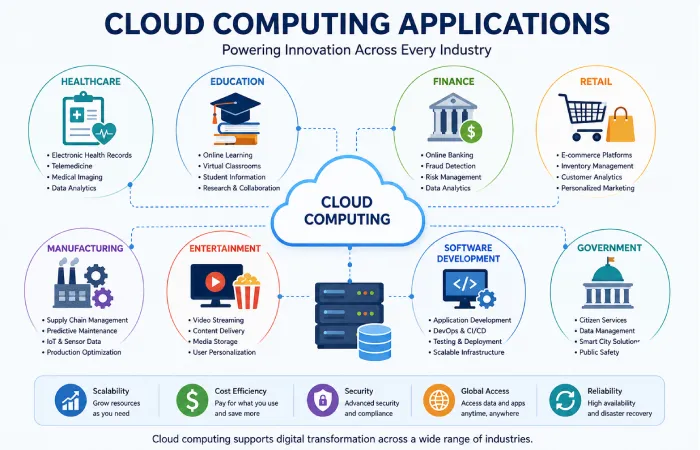
Cloud technology powers many everyday digital services.
Industries using Cloud include:
- Education
- Healthcare
- Banking
- Retail
- Manufacturing
- Government
- Media
- Logistics
- Software development
- Scientific research
Common examples include:
- Online learning platforms
- Customer relationship management (CRM)
- Enterprise resource planning (ERP)
- Video conferencing
- Website hosting
- Data analytics
- Artificial Intelligence
- Internet of Things (IoT)
Cloud Security Considerations
Security remains an important aspect of Cloud adoption.
Common security measures include:
- Data encryption
- Multi-factor authentication
- Identity and access management
- Continuous monitoring
- Backup strategies
- Compliance certifications
- Security auditing
Despite Cloud providers’ spend on security, organisations nevertheless remain responsible for the security of user accounts, resource permissions and confidential data.
Cloud vs Traditional Computing
| Feature | Cloud Computing | Traditional Computing |
| Infrastructure | Internet-based | Local hardware |
| Initial investment | Lower | Higher |
| Scalability | High | Limited |
| Maintenance | Provider managed | Organisation managed |
| Accessibility | Remote | Usually local |
| Software updates | Automatic | Manual |
| Deployment speed | Fast | Slower |
Expectations: What Cloud Can and Cannot Do
Cloud computing offers many advantages, but it is not a solution to every technology challenge.
What Cloud Can Do
- Improve scalability
- Simplify software deployment
- Enable remote collaboration
- Reduce infrastructure management
- Increase operational flexibility
What Cloud Cannot Guarantee
- Zero downtime
- Unlimited performance
- Complete immunity from cyber threats
- Elimination of all IT costs
- Automatic compliance with every regulation
Successful Cloud adoption still requires good planning, cybersecurity practices and ongoing management.
Challenges of Cloud Computing
Despite its benefits, Cloud computing presents some challenges.
These may include:
- Internet dependency
- Data privacy concerns
- Vendor lock-in
- Compliance requirements
- Service outages
- Cost management
- Migration complexity
- Skills shortages
Understanding these limitations helps organisations develop realistic implementation strategies.
Who Should Use Cloud Computing?
Cloud services are suitable for many different users.
Students
- Online learning
- Cloud storage
- Collaboration
Small Businesses
- Affordable infrastructure
- Business applications
- Website hosting
Large Enterprises
- Global operations
- Data analytics
- Digital transformation
Developers
- Application testing
- Software deployment
- Continuous integration
Content Creators
- Media storage
- Video editing workflows
- File sharing
Future of Cloud Computing
Cloud technology continues to evolve alongside emerging innovations.
Future trends include:
- Artificial Intelligence integration
- Edge computing
- Serverless architecture
- Green data centres
- Quantum computing research
- Increased automation
- Improved cybersecurity
- Industry-specific Cloud platforms
As internet connectivity improves worldwide, Cloud adoption is expected to continue expanding across nearly every industry.
FAQ’s
What is Cloud computing?
Cloud computing is the delivery of computing resources such as storage, servers, software and networking over the internet instead of relying solely on local hardware.
Is Cloud computing secure?
Most high-quality Cloud providers offer robust security. Organisations will have to adopt strong passwords, multi-factor authentication as well as right levels of controls.
Do I need technical knowledge to use Cloud services?
Basic Cloud services such as online storage or email require very little technical knowledge. Advanced infrastructure management may require specialised IT skills.
Is Cloud computing expensive?
Cost is on a consumption basis. Several providers provide flexible priced plans allowing Cloud services to be used by anyone, from an individual or a small business up to a large enterprise.
What industries benefit most from Cloud computing?
All sectors healthcare, education, finance, retail, manufacturing, logistics, media, software development and government profiting from Cloud technology.
Conclusion
Cloud computing has grown rapidly in adoption to meet the demands of many digital requirements. Providing an efficient, reliable and scalable network for use in workloads varying from personal file storage to enterprise applications, cloud computing has become a fundamental asset to businesses large and small.
In conclusion, while the many benefits of the Cloud should not be underestimated, the reality of Cloud deployment has to be seen as practical, so for example, realistic planning and appropriate security management needs to be thought about. With an appreciation of how Cloud operates, its various deployment model, and imposed constraints, Cloud technology can be utilised effectively.
