
Last Updated: June 24, 2026
Table of Contents
Definition
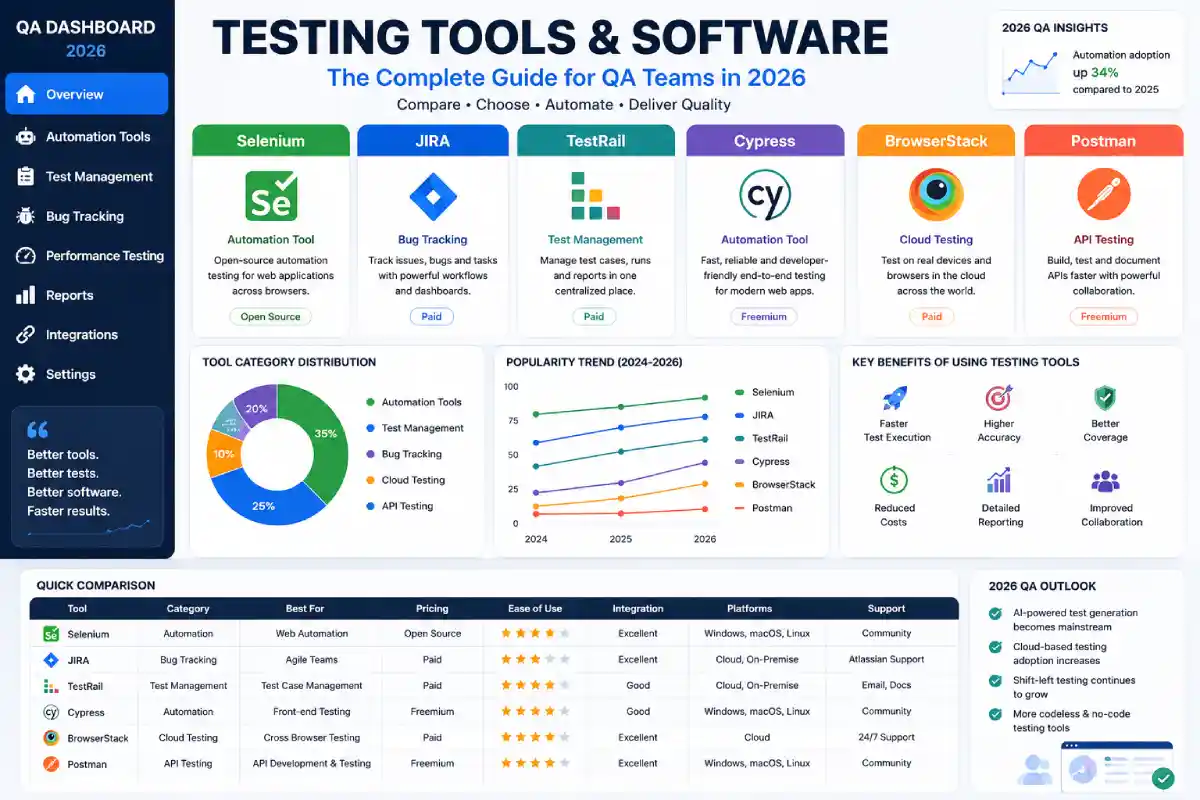
Testing Tools & Software are the platforms and applications used by QA and development professionals in planning, managing, running, automating, and controlling the process of software program testing. By using these tools, defects can be found, the applications can be tested to ensure that the desired functionality has been achieved and quality issues can be prevented before the product is delivered to the user.
Why Testing Tools & Software Matter
To achieve high software Testing quality, fast release cycles, and prompt, reliable delivery, organizations need to choose suitable testing tools and software. With the help of Automation frameworks, defect tracking, and test management platforms, modern software teams ensure quality throughout the entire SDLC, and as Agile and DevOps will continue to reign supreme in 2026, the selection of the right testing stack would be a strategic business choice.
What Are Testing Tools & Software?
The testing tools are software used by teams to plan, run, automate, track and report activities concerning testing software.
They generally fall into five categories:
- Test automation tools
- Defect tracking tools
- Test management platforms
- Performance testing tools
- Continuous testing solutions
Rather than replacing samples, these tools enhance efficiency and constancy.
Best Software Testing Tools
1. Selenium
Selenium has been a hot automation framework since its inception. It is also one of the most popularly used open-source automation comparison frameworks.
Best For
- Web application testing
- Cross-browser validation
- Automation engineers
Key Features
- Supports multiple programming languages
- Works with major browsers
- Large community support
- Integrates with CI/CD pipelines
Advantages
- Free and open source
- Highly flexible
- Extensive ecosystem
Limitations
- Steeper learning curve
- Requires coding knowledge
2. JIRA for QA Teams
Originally designed for project management, JIRA has become an essential QA collaboration platform.
Best For
- Defect tracking
- Agile workflows
- Team collaboration
Key Features
- Bug lifecycle management
- Sprint planning
- Workflow customization
- Dashboard reporting
Advantages
- Strong Agile support
- Excellent reporting capabilities
- Integrates with testing plugins
Limitations
- Configuration complexity
- Premium features increase costs
3. TestRail
TestRail is one of the leading test management tools.
Best For
- Managing manual test cases
- Reporting test progress
- Team coordination
Key Features
- Test case repositories
- Execution tracking
- Reporting dashboards
- Requirement traceability
Advantages
- User-friendly interface
- Detailed analytics
- Scalable for growing teams
Limitations
- Subscription costs
- Requires process discipline
4. Cypress
Cypress continues gaining popularity among modern web development teams.
Best For
- Front-end testing
- Developer-focused automation
- Fast feedback loops
Key Features
- Real-time execution
- Automatic waits
- Interactive debugging
- Developer-friendly setup
Advantages
- Easy installation
- Excellent debugging experience
- Fast execution
Limitations
- Limited multi-tab support
- Principally web-focused
5. BrowserStack
Browsers tack allows cloud-based testing across plans and browsers.
Best For
- Cross-browser testing
- Mobile compatibility validation
- Distributed teams
Key Features
- Real device cloud
- Parallel testing
- Visual testing support
- Global accessibility
Advantages
- Eliminates device labs
- Broad coverage
- Scalable infrastructure
Limitations
- Subscription expenses
- Internet dependency
Comparison Table: Best Software Testing Tools
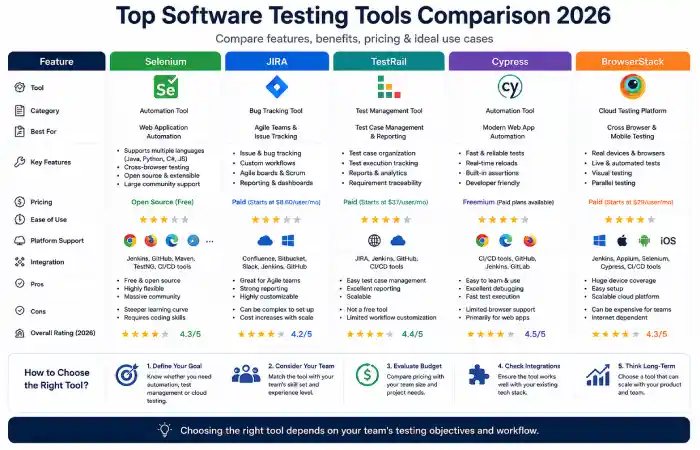
| Tool | Category | Best For | Pricing Model | Coding Required |
| Selenium | Automation | Cross-browser testing | Free | Yes |
| JIRA | Defect Tracking | Agile QA teams | Paid | No |
| TestRail | Test Management | Manual testing teams | Paid | No |
| Cypress | Automation | Front-end testing | Freemium | Yes |
| BrowserStack | Cloud Testing | Device testing | Paid | Optional |
Selenium Tutorial for Beginners
Basic Selenium Workflow
Step 1
Install Selenium libraries.
Step 2
Download browser drivers.
Step 3
Write automation scripts.
Step 4
Execute test cases.
Step 5
Review execution reports.
Common Selenium Use Cases
- Login testing
- Form validation
- Regression testing
- Checkout flow testing
Understanding Test Management Tools
Test management software centralizes testing activities.
These tools help teams:
- Organize test cases.
- Assign responsibilities.
- Track execution status.
- Generate compliance reports.
- Improve collaboration.
Popular Test Management Solutions
| Tool | Ideal Team Size |
| TestRail | Small to Enterprise |
| Zephyr | Agile Teams |
| Xray | JIRA Users |
| qTest | Large Organizations |
Automated Testing Platforms in 2026
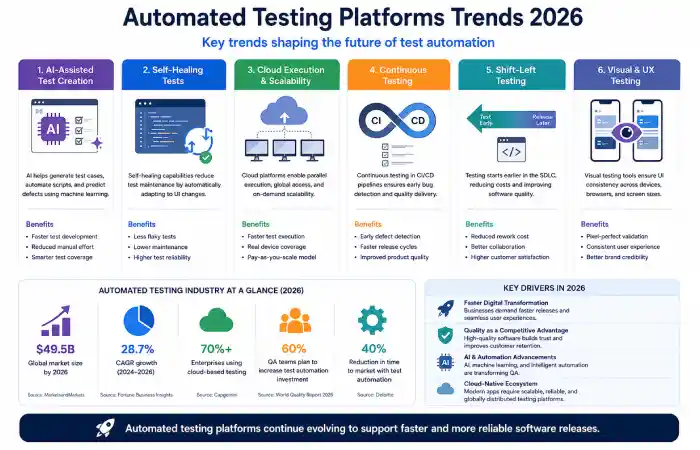
Automation adoption continues to rise due to faster release expectations.
Emerging Trends
| Trend | Business Impact |
| AI-Assisted Test Creation | Faster script generation |
| Self-Healing Tests | Reduced maintenance |
| Continuous Testing | Improved release confidence |
| Cloud Execution | Enhanced scalability |
| Visual Testing | Better UI consistency |
Administrations are increasingly applying a collection of answers instead of trusting on a single application.
Which Testing Implementation Would You Choose?
| Scenario | Recommended Tool |
| Learning Automation | Selenium |
| Agile Defect Tracking | JIRA |
| Managing Test Cases | TestRail |
| Modern Front-End Teams | Cypress |
| Cross-Device Validation | BrowserStack |
Your ideal stack depends on budget, team expertise, and project complexity.
Troubleshooting Common Challenges
Automation Scripts Frequently Break
Causes
- Dynamic elements
- Poor locator strategies
Solutions
- Use stable selectors.
- Adopt page object patterns.
Teams Lose Track of Test Cases
Causes
- Spreadsheet dependency
- Manual processes
Solutions
- Implement dedicated test management tools.
Cross-Browser Issues Persist
Causes
- Limited device coverage
Solutions
- Use cloud testing platforms like BrowserStack.
FAQ’S
What are the best software testing tools in 2026?
The most common of the above mentioned are Selenium, JIRA, TestRail, Cypress, BrowserStack etc.
Is Selenium still relevant?
Yes. Selenium remains a leading open-source framework due to its flexibility and extensive ecosystem.
Can beginners use JIRA?
Absolutely. Although advanced workflows require configuration, beginners can quickly learn bug tracking and reporting.
What is the difference between automation tools and test management tools?
Automation tools execute tests, while test management tools organize, track, and report testing activities.
Should small teams invest in paid tools?
It depends on scale. Smaller teams often begin with free solutions and expand as testing complexity grows.
Conclusion
Choosing the right Testing Tools & Software is not merely a technical decision today-it is intertwined with product quality, team productivity, and customer satisfaction. From Selenium and Cypress for automation to JIRA and TestRail for collaboration and management, each tool has distinct supplies for different testing processes.
Companies that have a robust and balanced challenging environment are more capable to release quality products in a timely and reliable manner in 2026.
